Onboarding Guide
Moving In? Follow these simple steps to get connected to the NET360 Network.
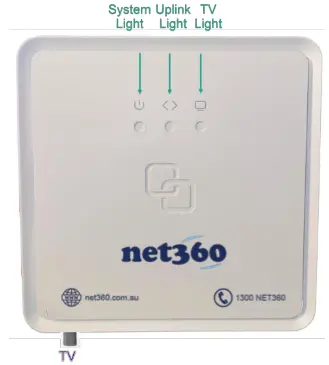
Locate your NET360 NTD
Your developer/ builder has opted to locate the NTD within one of your bedroom cupboards, or garage
Please locate the device, it should resemble the device on the left
Once your device has been located please ensure it is turned on.
- System light is Solid Green
- Uplink light is Solid Green
- TV light is Solid Green*
NTD Services
The NET360 NTD is a multi-service device
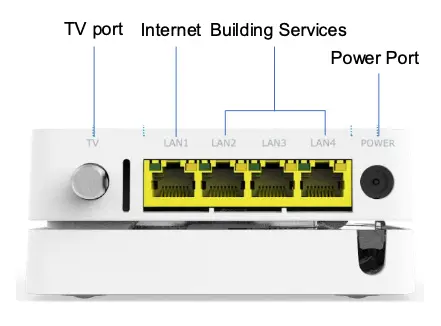
Each port on the NTD has a specific purpose and must only be used for that purpose. See the following pictorial for an explanation of each port you see on the NTD.
You may have more or less ports, however, the purpose of each port is still the same.
NTD Services Ports
- TV Port - This port provides your TV Signal
- Internet Port - This port will connect to your WiFi Modem
- Building Services Ports - These ports may be connected to additional building services. Please do not touch these connections
Frequently Asked Questions
The location of the NTD is typical in the bedroom cupboard or garage. Other places to look are in general purpose cupboards. You may also find it installed at the top of your cupboard.
If your developer/builder has opted into additional services. These services are delivered using the additional ports available on our NET360 NTD. A typical additional service is your free to air TV service. This service is delivered over our Fibre network.
You can reach our customer support team by logging a help desk ticket at https://www.net360.com.au/helpdesk