How to connect your TV
Your Free to Air TV over Fibre
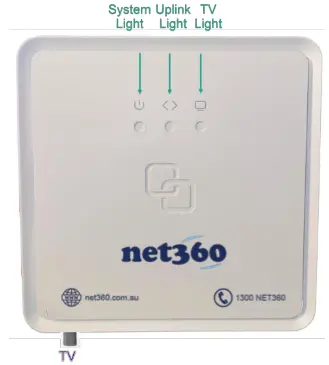
Locate the NET360 NTD
Your TV signal is provided through our fibre network and delivered to a TV port on the NET360 NTD.
Locate the NET360 NTD and ensure the TV Light is on green and solid
Ensure your TV point is connected
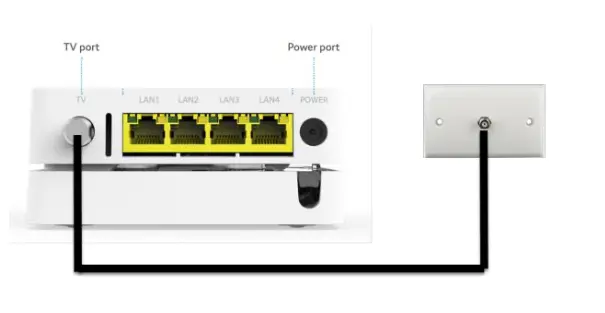
In order to distribute the TV signal throughout your home, the NTD must be connected to your TV point.
- There should be a TV wall port near the to NET360 NTD.
- Ensure that there is a antenna cable connecting the NTD to the TV Port (see photo on right)
Connect your TV
Once you have verified the TV point is connected. Locate the TV port in your TV Room/Living Room.
Use an antenna cable to connect this TV wall point to your TV antenna input
Follow the standard procedure of tuning your TV to pick up the local
channels
If your TV is not functioning please contact Net360 on 1300 NET360 or via the following link at https://net360.com.au/helpdesk
Frequently Asked Questions
- First check that with the developer to see if this service is available at your location.
- Check that the TV Light on the NET360 NTD is green and solid on
- If it is off (no light), then your location may not TV provided by NET360's fibre network
- If it is blinking, please contact NET360
- Check the cabling and ensure there is an antenna cable connect the TV Port on the NTD to the TV point on the wall.
If the antenna cable is missing between the TV port and the wall port. Please contact the developer or body corporate.
You can reach our customer support team by logging a help desk ticket at https://www.net360.com.au/helpdesk